Showing posts with label Windows 10. Show all posts

Thursday, August 11, 2016

GetBestRoute bug in Windows 10 Anniversary Release 1607

After upgrading to Windows 10 Anniversary Release 1607 on August 6, 2016, I noticed something strange happening with ARP Scanning Tool and I traced it to an intermittent problem in the IpHlpApi function GetBestRoute.

When the computer is first booted, GetBestRoute works normally as it has in NetScanTools Pro for years and as it has on other Windows operating systems. I am using it to determine if an IPv4 address can be reached LOCALLY without going through the Default Gateway. Operating System specifics:  64 bit OS build 14393.51, only one ethernet wired 1GB network interface connected to an IPv4 network. Compiled as a 32 bit application using VC++ 2012.

Code snippet:

MIB_IPFORWARDROW IPForwardRow;
memset(&IPForwardRow, 0, sizeof(IPForwardRow));

DWORD dwResult = GetBestRoute(targetIPAddress, outgoingIf, &IPForwardRow);

// note the fail on getting non-local route
if(dwResult == NO_ERROR && IPForwardRow.dwForwardType != MIB_IPROUTE_TYPE_DIRECT)
{
 // note the failure with a popup stating that the route is not local,
 // ie. not on the same subnet or local network segment
}

Problem statement: if you pass in ANY targetIPAddress between 192.168.0.1 and 192.168.0.254 and outgoing interface is 192.168.0.205 on your computer, it should come back with MIB_IPROUTE_TYPE_DIRECT. This is the normal way it works. Here is a view of the contents of the IPForwardRow structure as it should appear with 192.168.0.1 and 192.168.0.205 as the interface (192.168.0.1 is the default gateway).


You can see the dwForwardDest is populate correctly as is dwForwardMask and the ForwardType is direct as expected.

But for any other IPv4 address 192.168.0.2 through 192.168.0.254, you get this with empty dwForwardDest and dwForwardMask with the route type INCORRECTLY shown as MIB_IPROUTE_TYPE_INDIRECT.


Obviously something was broken in this new Windows 10 release. It is intermittent but once it goes into this failure mode, it stays in the failure mode until the computer is rebooted. I do not know what the trigger is.

I have fixed it by writing my own GetBestRoute equivalent - but I should not have to do that. Microsoft PLEASE FIX this ASAP!


Thursday, August 13, 2015

How I installed Windows 10 on an old Dell Inspiron 1520 laptop

Windows 10 Pro retail release on a 9 year old laptop? yes. It can be done. But it wasn't easy.

Where I started from:
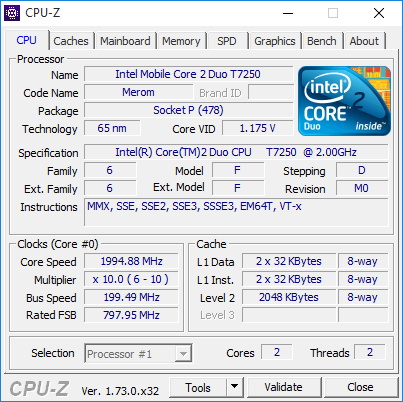
The Inspiron 1520 has 4GB ram, a 2Ghz Core2 Duo, a SanDisk Ultra II SSD and it had 32 bit Windows 7 which was an upgrade from the original Vista 32.  I cloned the SSD to another hard drive before getting started. I used a Windows 10 32 bit ISO burned to a DVD. For tries 1 and 2, I used WiFi to access the internet.

1st try - everything seemed to go well, I let it download updates to the install. But then it got to the first reboot. It hung on the light blue window logo with the spinning dots. After half an hour I manually rebooted it and it gave this message "0xC1900101 - 0x20017 The installation failed in the SAFE_OS phase with an error during BOOT operation". Windows 7 was back, so I tried again.

2nd try - similar to the first (I allowed updates). The reboot phase was different this time - no logo with spinning dots. There was a cursor. Window 7 did come back to life.

So I did some fruitless research and found that the error message might be related to a driver. So I did things differently on the third and final try.

3rd try - this time I flipped the switch that turned off WiFi, plugged in an Ethernet cable (for Windows activation) and Bluetooth and I told the installer not update before installing. It worked. After the first reboot I got the large circle showing upgrade progress. Then finally I got to "Hi there, welcome back!" and finished the upgrade. But I wasn't done - read on.

Windows 10 was showing the desktop in 1024x768 mode instead of the native 1440x900. Display settings would not allow me to go that high, so I unplugged the Ethernet cable and switched on WiFi. Then I downloaded the updates. After rebooting the NVidia driver was active and gave me the option to go to 1440x900.

Next, I started going through apps to check compatibility. NetScanTools Pro, the Managed Switch Port Mapping Tool and related products worked normally as did iTunes and Office 2007. But SanDisk SSD Dashboard 1.4.1 hung on startup and consumed 98% of CPU time no matter what I did. Obviously SanDisk has some work to do.

Later I went into the Startup tab of Task Manager to disable old unused drivers - that speeded up boot time and stopped a crash message on power down.

It wasn't easy, but I now have Windows 10 Pro 32 bit running. I would really like to get x64 running on it instead. Another time.

Here are screenshots of the System window and below it is the CPU-Z.


Wednesday, June 10, 2015

Win10Pcap - a WinPcap fork

Today Gerald Combs graciously forwarded me an announcement about a new fork to WinPcap called Win10Pcap based on NDIS 6. I immediately tested it with Wireshark and NetScanTools Pro.

Since this fork uses a different kernel mode driver name - ie, NOT npf.sys, Wireshark shows the popup message "The NPF driver isn't running. You may have trouble capturing or listing interfaces.". However, even though this message shows Wireshark will run because Wireshark loads packet.dll and wpcap.dll - these two DLL interfaces are unchanged (the WinPcap SDK interface is supposedly unchanged) so no matter what the driver is called, it starts. So, yes, Wireshark 1.12.5 appears to run with this fork of WinPcap.

That brings me to NetScanTools Pro. Not only does NetScanTools Pro capture packets (like Wireshark), it also sends packets. I tested the ARP, Ping and Traceroute tools that depend on WinPcap for sending packets. They appeared to work OK.

I was just about to release NetScanTools Pro 11.70, so I was able to make my test for active running npf.sys also test for the new service name - so that means NetScanTools Pro will be able to detect either the official WinPcap 4.1.3 and successors or this new fork.

Note that old WinPcap 4.1.3 DOES WORK FINE on later releases of Windows 10 builds based on NDIS 5. So it's your choice as to whether you need to use this new fork.

You may download this new WinPcap fork from http://www.Win10Pcap.org/ however, since they use GPLv2 instead of BSD license as WinPcap has historically done, we will not be including the installer with NetScanTools Pro.

Congrats to the author of Win10Pcap! (but what happens to the name when Win 11 is released?)

Friday, April 24, 2015

Updated: Wireshark and WinPcap 4.1.3 on Windows 10 Enterprise Build 10061

This release of Windows 10 Enterprise Technical Preview Build 10061 seems to run the 'old' WinPcap just fine. Whatever was broken in 10041 was fixed - I wonder: was NDIS backwards compatibility restored? I don't know, but it works. At least for now. With the rumored final Windows 10 release coming in July 2015, things had better start to get finalized soon. That means networking too.

So for now, Windows 10 build 10061, seems to capture packets fine with Wireshark 1.12.4 and old 4.1.3 WinPcap release. WinPcap also sends customized packets correctly from NetScanTools Pro v11. We'll see what the next build does.

Update June 5, 2015: WinPcap 4.1.3 also runs on build 10130.

Kirk

Tuesday, March 24, 2015

Updated: WinPcap and Wireshark problems on Windows 10 Tech Preview 10041

Update June 5, 2015: WinPcap 4.1.3 works on build 10130.

Update May 13, 2015: WinPcap 4.1.3 began to work again in Windows 10 preview 10061 and continues to operate in 10074. Hopefully, this trend continues - but I wouldn't count on it. But we still need to encourage Riverbed to update WinPcap from NDIS5 to NDIS6. Work has been done on this at NMAP and has been shared, so it would be great if WinPcap.org could expand on that work and release WinPcap fully compatible with NDIS6. Another issue is driver signing: in Windows 10 x64 that really will be changing, so it will be important for WinPcap to be updated before the RTM release - more about this here.

Update 3-27-15: Do you want to use Wireshark on Windows 10? Tweet about this problem! do a post about this issue. Bring it up at Sharkfest in June.

Update 3-26-15: This has been confirmed by others and a thread has been started here:
http://www.winpcap.org/pipermail/winpcap-users/2015-March/004935.html
I will be posting about it on twitter: https://twitter.com/NetScanTools

Up until release 10041 all Windows 10 Tech Preview versions have appeared to run WinPcap 4.1.3 without a problem. Even the last version 9926 worked OK, but now we have a problem - a big problem.

About the test machine: Shuttle xpc, quad core cpu, 8GB RAM. Host OS is Windows 7 x64. Windows 10 x64 Enterprise 10041 is a guest OS running inside VirtualBox 4.3.26 r98988. Network Adapter in the VM is in Bridged mode. Physical network adapter in the Shuttle is Generic Marvell Yukon 88E8056 based Ethernet controller.

Here's what I did...and what happened...
On March 23 I upgraded 9926 to 10041 and then installed Wireshark x64 v1.12.4 from wireshark.org. Everything installed fine and WinPcap installed normally. I fired up Wireshark and got the message "No interface can be used for capturing in this system with the current configuration.". Pressing the Refresh Interfaces button did not fix it.


I know that Wireshark checks the status of the NPF driver before getting that far, so I thought maybe I should verify it manually in a Command Prompt. You can see that the Service Control Manager says it is RUNNING.


NetScanTools Pro. Since I wrote it, I know what checks are done where. I know that it loads wpcap.dll and packet.dll and checks the status of the NPF driver. So far so good. I go to the ARP Scanner (it uses WinPcap to send and receive packets) and pressed Do ARP Scan. I got this message. The arrow is pointing to a message that comes directly from WinPcap itself: "No interfaces found! Make sure libpcap/WinPcap is properly installed on the local machine."


I know exactly which function call returned that message: pcap_findalldevs_ex

pcap_findalldevs_ex is what you call to find all the WinPcap compatible interfaces on the system. If it fails, you're done. I poked through the Wireshark code and they are calling it too most likely on start.

Where do we go from here?
Obviously Microsoft changed something. Did they change NDIS? Or something else?

I've tried all the obvious things - changing compatibility mode, running the programs as administrator - nothing works. A driver expert (which I am not) needs to dive into the WinPcap code and figure this out - and soon!

If nothing is done Wireshark, nmap, NetScanTools Pro and any other apps depending on WinPcap for capturing and sending packets will not operate on Windows 10 if the changes Microsoft made are permanent.

What is your experience? has anyone else tried Wireshark on Windows 10 Enterprise 10041? Win10 has always worked on VirtualBox - has anyone tried Wireshark on Win10 in VMware or native boot?

Monday, March 9, 2015

NetScanTools LE v1.52 Released on March 6, 2015

The latest release of NetScanTools LE (designed for Law Enforcement) was ready on March 6, 2015.

Version 1.52 makes operational changes to Port Scanner/Scan Common Ports to scan only the current protocol type selected, ie. TCP, UDP or TCP+UDP. Previous versions scanned using the whole list, TCP+UDP regardless of the selection.

Whois has improved support for IPv6 and the ability to get whois information for the new top level domains was greatly expanded.

We tested it on Windows 10 Enterprise version. Everything operated normally as far as we could see.

WinPcap: only one part of NetScanTools LE uses WinPcap - the Packet Capture Tool. Due to recent issues customers have had with WinPcap on Windows 8.1, we decided to add in a test to make sure WinPcap is installed and running. If npf.sys is not running you will not be able to launch the Packet Capture Tool.

We updated SQLite to v3.8.8.3 and also updated the database files.

Please visit http://www.netscantools-le.com/ to get the latest version. You may install it over previous versions.