The latest release of NetScanTools LE (designed for Law Enforcement) was ready on March 6, 2015.
Version 1.52 makes operational changes to Port Scanner/Scan Common Ports to scan only the current protocol type selected, ie. TCP, UDP or TCP+UDP. Previous versions scanned using the whole list, TCP+UDP regardless of the selection.
Whois has improved support for IPv6 and the ability to get whois information for the new top level domains was greatly expanded.
We tested it on Windows 10 Enterprise version. Everything operated normally as far as we could see.
WinPcap: only one part of NetScanTools LE uses WinPcap - the Packet Capture Tool. Due to recent issues customers have had with WinPcap on Windows 8.1, we decided to add in a test to make sure WinPcap is installed and running. If npf.sys is not running you will not be able to launch the Packet Capture Tool.
We updated SQLite to v3.8.8.3 and also updated the database files.
Please visit http://www.netscantools-le.com/ to get the latest version. You may install it over previous versions.
Showing posts with label port scanner. Show all posts
Showing posts with label port scanner. Show all posts
Monday, March 9, 2015


Monday, July 29, 2013
NetScanTools Pro v11.51 Released on July 18, 2013
This is the latest release and although it does not include any new tools, it does include new and improve charting (graphics) giving quick access to information about the results of many tools at a glance. For instance, this is the new summary chart for Port Scanner. It summarizes the responding TCP ports into Active Ports, Active Ports returning data, Ports Rejecting a TCP connection and No Response Timeout all in an easy to understand pie chart:

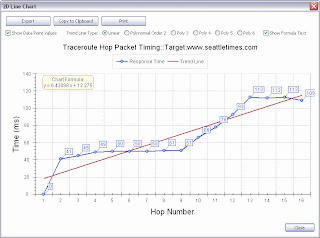
Another new feature is the addition of Trend Line Analysis to the Timing Charts. This shows either a linear trend line or an advance polynomial fitting to the data. You can see the formula too. And print and save to a bitmap. Here is a linear fit to the traceroute hop vs. response time chart:
And now a polynomial fit. You can chose from several trend line polynomial degree fittings.

New Features:
-ARP Scan, Ping Scanner and Port Scanner: New summary pie charts show an overview of the results. This is especially important in large data results (port scanner) situations where you may or may not quickly locate an open port in a long list of port results.
-ARP Ping, Ping - Enhanced, Ping Scanner, Traceroute: The 2 dimensional Timing Charts now have trend line analysis. There are linear line fitting plus a number of polynomial curve fitting options available. The line formula can be optionally shown. Each tool has a button to display the Timing Chart after you have used the tool.
Changes:
-Packet Flooder: added total data bytes sent to status.
-Manual Tools Left Panel: Duplicate IP Scanner is now in the right alphabetic order.
-SNMP - Core and Advanced: SNMPv3 Context field is now correctly passed in the outgoing SNMPv3 packet. Bulk Repetitions now defaults to 32.
-ARP Cache: renamed Index column to I/F Index (interface index).
-Port Scanner: many internal changes to improve operation when scanning large port ranges. Changes to show rejected TCP connections and more clearly define Closed and Filtered UDP ports.
-Whois: added 16 new Top Level Domains (TLDs) to database.
-Updated SQLite to 3.7.17
-Updated database files.

Another new feature is the addition of Trend Line Analysis to the Timing Charts. This shows either a linear trend line or an advance polynomial fitting to the data. You can see the formula too. And print and save to a bitmap. Here is a linear fit to the traceroute hop vs. response time chart:

And now a polynomial fit. You can chose from several trend line polynomial degree fittings.

New Features:
-ARP Scan, Ping Scanner and Port Scanner: New summary pie charts show an overview of the results. This is especially important in large data results (port scanner) situations where you may or may not quickly locate an open port in a long list of port results.
-ARP Ping, Ping - Enhanced, Ping Scanner, Traceroute: The 2 dimensional Timing Charts now have trend line analysis. There are linear line fitting plus a number of polynomial curve fitting options available. The line formula can be optionally shown. Each tool has a button to display the Timing Chart after you have used the tool.
Changes:
-Packet Flooder: added total data bytes sent to status.
-Manual Tools Left Panel: Duplicate IP Scanner is now in the right alphabetic order.
-SNMP - Core and Advanced: SNMPv3 Context field is now correctly passed in the outgoing SNMPv3 packet. Bulk Repetitions now defaults to 32.
-ARP Cache: renamed Index column to I/F Index (interface index).
-Port Scanner: many internal changes to improve operation when scanning large port ranges. Changes to show rejected TCP connections and more clearly define Closed and Filtered UDP ports.
-Whois: added 16 new Top Level Domains (TLDs) to database.
-Updated SQLite to 3.7.17
-Updated database files.
Thursday, January 19, 2012
NetScanTools Pro 11.20 Released January 19
NetScanTools Pro v11.20 was release today. It has one new tool and 2 revised tools.
The new tool is called Country to IP or ASN. Select a country from the list and find the IPv4, IPv6 or ASN records assigned or allocated to that country. This tool works from a local database that is updated with each release. It is a complementary tool to the IP to Country tool and there are now 'jump' buttons on each to switch between them. This tool is really useful if you maintain a firewall or an email server. If you prefer to block a whole country - this is where you get your information.
DHCP Server Discovery now has the ability to do DHCP Discovery on more than one network. You can now select the network interface to do the discovery on. This would apply to a laptop running both a wired and wireless connection.
Port Scanner now allows you to do a port scan on a list of IPv4 addresses. This was something that existed in v10 and earlier, but we did not have it ready for the release of version 11. It's back and better than before.
There are a few other minor fixes. This release was planned for December, but some users made suggestions that were necessary (like the DHCP changes) and here we are.
Look for the USB version patch release next week.
Kirk
The new tool is called Country to IP or ASN. Select a country from the list and find the IPv4, IPv6 or ASN records assigned or allocated to that country. This tool works from a local database that is updated with each release. It is a complementary tool to the IP to Country tool and there are now 'jump' buttons on each to switch between them. This tool is really useful if you maintain a firewall or an email server. If you prefer to block a whole country - this is where you get your information.
DHCP Server Discovery now has the ability to do DHCP Discovery on more than one network. You can now select the network interface to do the discovery on. This would apply to a laptop running both a wired and wireless connection.
Port Scanner now allows you to do a port scan on a list of IPv4 addresses. This was something that existed in v10 and earlier, but we did not have it ready for the release of version 11. It's back and better than before.
There are a few other minor fixes. This release was planned for December, but some users made suggestions that were necessary (like the DHCP changes) and here we are.
Look for the USB version patch release next week.
Kirk
Subscribe to:
Posts (Atom)