Showing posts with label XML. Show all posts

Friday, November 10, 2017

Managed Switch Port Mapping Tool v2.78 Released November 8, 2017

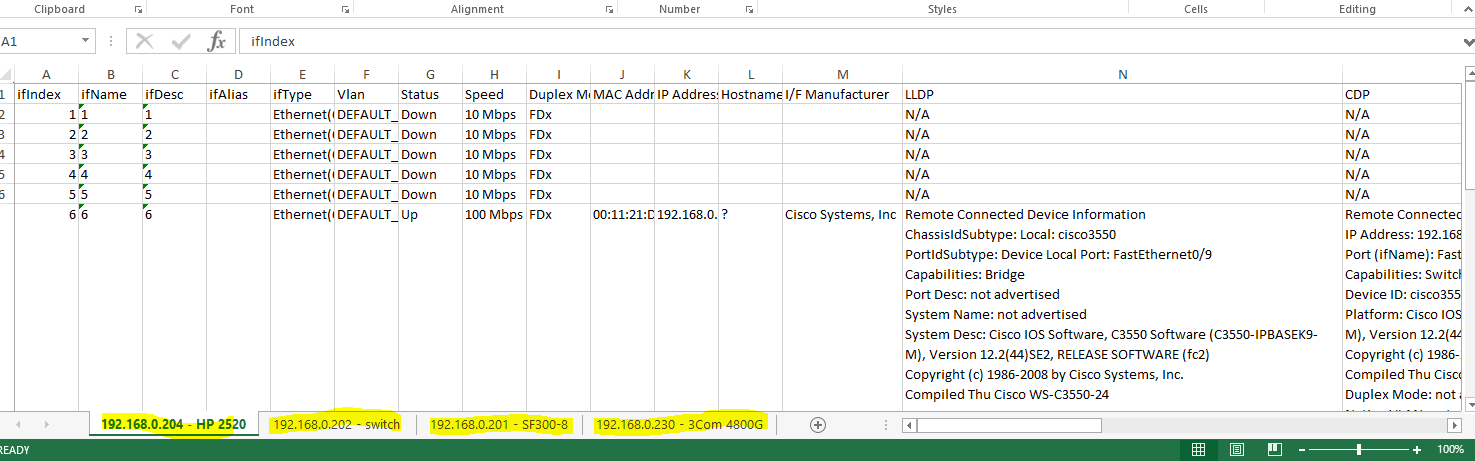
This release has one new function that has been requested by our users many times: the ability to export the results of a Switch List mapping to XML for easy opening in Microsoft Excel. Here is what it looks like when opened with Excel.


After mapping a Switch List, go to Review History, then select the Switch List and press Export Selected Switch List to XML.
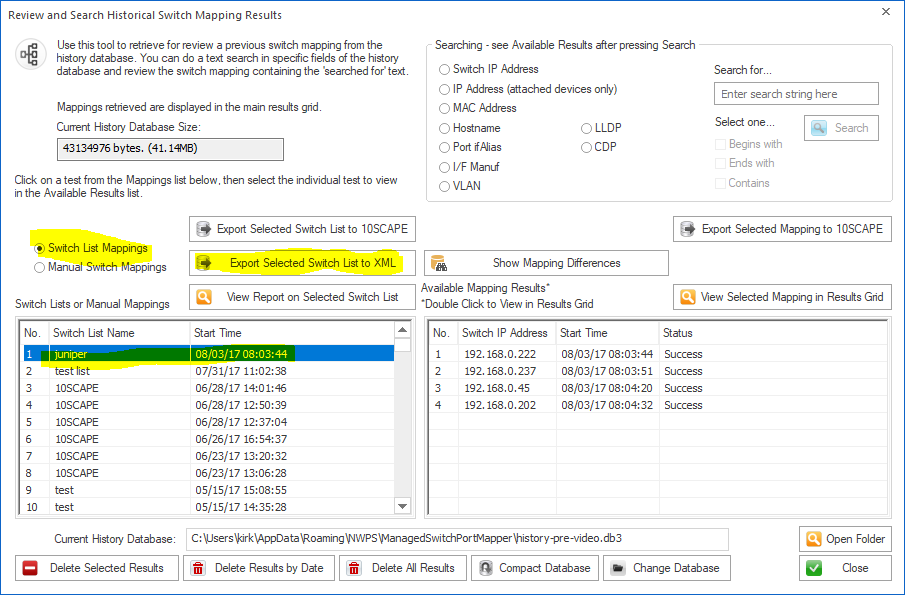

While we are looking at Review History, another thing added in this release was searching of LLDP and CDP fields. See it below.


Those are two of the more important changes in v2.78. Here are all the changes. Download v2.78 from http://www.switchportmapper.com/download.htm

-New XML export option for Switch Lists from Review History. When the XML export is opened in Microsoft Excel, each switch results appear as a separate sheet. Each row in a multi-row port (ports with more than one mac address) are shown as separate rows in the XML output. Export progress is now shown on the bottom status bar.
-Review History/Searching now has selections for searching LLDP and CDP for text strings. Searching now defaults to 'Contains' if no options are selected and the search results shown in the right hand list are a bit wider. Search results are now shown in descending order - newest at the top. 'RecNo' in the two lists have been changed to 'No.".
-Corrected reporting of Switch Operational State for Extreme Networks switches.
-Corrected and removed '00 00' showing in Interface Alias column for Force10 switches.
-Warning is now shown if 10SCAPE export does find LLDP data for the switches. Switches with no reported LLDP data are shown. Export progress is now shown on the bottom status bar.
-Added new right click menu option to clear both the results grid and the Switch Info left control panel window.
-Improved parsing of MAC and IP addresses from LLDP data.
-Added Interface Manufacturer derived from remote MAC address in LLDP.
-Moved four tables from spmap database to working database.
-Updated SQLite to version 3.21.0

-Updated MAC address/Manufacturer database.


Wednesday, January 9, 2013

How to save XML results files from Switch Lists

This question has come up frequently from people who are using Managed Switch Port Mapping Tool v2.x in Switch List mode (this mode means two or more switches are mapped in succession).

To make individual XML files for each switch as it goes, go to the Switch List Editor and make sure 'save switch results as xml files after each switch mapping' is checked. This setting is different for each separate switch list and should be on by default.

Next, change your command line to:
spmap.exe -maplist TheSwitchListName -postexit

This tells the app to map the named list and exit when complete.

Here is the part people have a problem with: The files will be saved to either My Documents or the last used directory you saved XML files to from the menu.

You can override the path manually by mapping any switch or reloading results from history, then right click and select Export XML. Save the results to the directory you want everything to go to. When you run the switch list, it will save in that last location.

The XML filenames will have the format:
switch-ip_a.ip_b.ip_c.ip_d-unixTimestamp.xml

Please be aware that the command line option  -xml D:\switch.xml only works for a single switch.

This will be documented more fully in a subsequent release. You can get the application at http://www.SwitchPortMapper.com/

Friday, January 16, 2009

Next Switch Port Mapper Version almost ready

1.96 is almost ready. I've almost finished the documentation -- quite a few changes there especially in the new expanded "Getting Started" section.

The biggest thing about this version is the change from global setting of the SNMP parameters to individualized settings saved for each SNMP device. That way one can use SNMP v1 and another can use SNMP v2c or maybe even be on a non-standard port number -- whatever. Another significant change is in the look of the left side control panel. It's more organized now and hopefully easier to understand. The final significant change is in the XML export. It now conforms better to the XML standards Microsoft uses for Excel. After all the results are in a spreadsheet. The column widths are correct and the font is now supplied. It just plain looks better when you import it into Excel. If you don't have Excel, that's not a problem -- it also works with OpenOffice 3's Calc. It imports in just fine if you select the MS Excel 2003 XML import filter.

Look for it early next week. And one more thing, this is probably the last 1.x version. The internal and visible changes made in 1.96 were necessary to support the new cool things coming in 2.0...