I debated as to whether this should be 2.13 or 2.2 because normally a .2 release would mean new features. This release has new features, but in the end I settled on 2.13 because most of the changes were fixes to the LLDP and CDP columns.
The new features are showing the Switch Alias that you have created for a switch when you view the Left Panel/Select Config or Switch Lists/Edit Switch Config. This makes it much easier to see which switch you are wanting to deal with as opposed to seeing only the switch IP address.
The LLDP changes were numerous. First of all, LLDP is not indexed by ifIndex, it's indexed by any of a number of ways. Usually by the interface name, description or alias. It now works much better and will provide LLDP info in the right cell for most indexing options. The other big issue for LLDP was the IP address. Previously we were using the MAC address which is almost always sent in LLDP to lookup the IP in the database. But that didn't always work. So now if the switch has extended LLDP info, we get the IP address of the attached device from the switch LLDP data. In fact, we show them both and indicate the source of the IP address. IPv4 and IPv6 are supported from the extended LLDP info. Another problem with the previous way we reported LLDP was that if the field had no information, it was simply left blank. Now, in keeping with the way Cisco does it from CLI (show lldp neighbors), we use the statement 'not advertised'. That way you know that the data was not available to us.
The statement 'not advertised' was also extended to CDP, which by the way is indexed by ifIndex. There was also a correction to the parsing of the device capabilities field from CDP. You should not see 'unknown' very often any longer.
There was one other change to the number of rows displayed. You may see more loopback rows or similar. And as usual, the MAC Address to Manufacturer database was updated.
Please visit http://www.SwitchPortMapper.com/ to download the latest version 2.13.
Friday, October 11, 2013


Wednesday, October 2, 2013
NetScanTools Pro v11.52 Released Sept 24, 2013
NetScanTools Pro 11.52 was released last week and it has several improvements and updates the databases.
Packet Generator will now work better on Windows 8.x in that the operating system will no longer think it is 'not responding' while sending streams of packets. Earlier versions of Windows do not get confused like this, but apparently Windows 8 expects the message queue to be pumped more often. If the message queue is not cleared quickly enough Windows 8 grays out the software and calls it 'non-responding' which clearly was not the case with the Packet Generator.
Several things were done in Ping and Traceroute to give the user better feedback when the Windows Firewall settings are not allowing outgoing packets to be captured by WinPcap. Without knowing when the outgoing packets are sent, it's difficult to establish round-trip-time. A message will now appear explaining the problem and telling you to change the firewall settings or temporarily turn it off. The timing calculation shown in the analysis area below the results grid now shows sub-decimal timing calculations, ie. 123.456 ms instead of just 123 ms.
The Wireless Network Interface tool now has more concise explanations of what was found to better conform to industry standard terminology.
The USB version has a change that only affects the USB version: if the host has WinPcap 4.1.2 or 4.1.3 installed on it, the software uses the host's WinPcap instead of the WinPcap Pro that is on the USB. More about this in another blog post soon.
If you have an active maintenance plan, please start NetScanTools Pro, then click on Help/Check for New Version to access either the new v11.52 full install or USB upgrade patch.
Packet Generator will now work better on Windows 8.x in that the operating system will no longer think it is 'not responding' while sending streams of packets. Earlier versions of Windows do not get confused like this, but apparently Windows 8 expects the message queue to be pumped more often. If the message queue is not cleared quickly enough Windows 8 grays out the software and calls it 'non-responding' which clearly was not the case with the Packet Generator.
Several things were done in Ping and Traceroute to give the user better feedback when the Windows Firewall settings are not allowing outgoing packets to be captured by WinPcap. Without knowing when the outgoing packets are sent, it's difficult to establish round-trip-time. A message will now appear explaining the problem and telling you to change the firewall settings or temporarily turn it off. The timing calculation shown in the analysis area below the results grid now shows sub-decimal timing calculations, ie. 123.456 ms instead of just 123 ms.
The Wireless Network Interface tool now has more concise explanations of what was found to better conform to industry standard terminology.
The USB version has a change that only affects the USB version: if the host has WinPcap 4.1.2 or 4.1.3 installed on it, the software uses the host's WinPcap instead of the WinPcap Pro that is on the USB. More about this in another blog post soon.
If you have an active maintenance plan, please start NetScanTools Pro, then click on Help/Check for New Version to access either the new v11.52 full install or USB upgrade patch.
Thursday, September 5, 2013
NetScanTools August 2013 Newsletter
The NetScanTools newsletter was published last week and primarily it talks about the website overhaul of http://www.nwpsw.com using Bootstrap. Bootstrap (http://getbootstrap.com/) is an interesting set of CSS and JavaScript templates that allow your site to be viewed equally well in a desktop, mobile or tablet screen format without any changes to your site pages. Gerald Combs (Wireshark) told me about it - he converted Wireshark.org to use it earlier this year.
http://www.netscantools.com/pressandnewsletters/NST_News_August_2013.pdf
Enjoy!
Kirk
http://www.netscantools.com/pressandnewsletters/NST_News_August_2013.pdf
Enjoy!
Kirk
NetScanTools Basic v2.30 Released
On September 4 we released a minor update to NetScanTools Basic, our freeware entry level NetScanTools product. It is now at v2.30.
This update adds a right click menu to all the results windows giving you a way to copy information to the clipboard, print the results or save them to a text file. It also adds an automatic check for a new release (you can turn this off) and updates the whois server database. Since the whois database uses SQLite, we also updated that to the latest version 3.8.0.2.
How to get v2.30:
If you already have NetScanTools Basic, click on Help/Check for New Version and follow the directions in the embedded web page. Or you can go to http://www.netscantools-basic.com/ and download it directly. Install over the top of any old versions.
Enjoy!
This update adds a right click menu to all the results windows giving you a way to copy information to the clipboard, print the results or save them to a text file. It also adds an automatic check for a new release (you can turn this off) and updates the whois server database. Since the whois database uses SQLite, we also updated that to the latest version 3.8.0.2.
How to get v2.30:
If you already have NetScanTools Basic, click on Help/Check for New Version and follow the directions in the embedded web page. Or you can go to http://www.netscantools-basic.com/ and download it directly. Install over the top of any old versions.
Enjoy!
Monday, July 29, 2013
NetScanTools Pro v11.51 Released on July 18, 2013
This is the latest release and although it does not include any new tools, it does include new and improve charting (graphics) giving quick access to information about the results of many tools at a glance. For instance, this is the new summary chart for Port Scanner. It summarizes the responding TCP ports into Active Ports, Active Ports returning data, Ports Rejecting a TCP connection and No Response Timeout all in an easy to understand pie chart:

Another new feature is the addition of Trend Line Analysis to the Timing Charts. This shows either a linear trend line or an advance polynomial fitting to the data. You can see the formula too. And print and save to a bitmap. Here is a linear fit to the traceroute hop vs. response time chart:
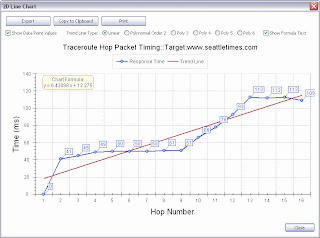
And now a polynomial fit. You can chose from several trend line polynomial degree fittings.

New Features:
-ARP Scan, Ping Scanner and Port Scanner: New summary pie charts show an overview of the results. This is especially important in large data results (port scanner) situations where you may or may not quickly locate an open port in a long list of port results.
-ARP Ping, Ping - Enhanced, Ping Scanner, Traceroute: The 2 dimensional Timing Charts now have trend line analysis. There are linear line fitting plus a number of polynomial curve fitting options available. The line formula can be optionally shown. Each tool has a button to display the Timing Chart after you have used the tool.
Changes:
-Packet Flooder: added total data bytes sent to status.
-Manual Tools Left Panel: Duplicate IP Scanner is now in the right alphabetic order.
-SNMP - Core and Advanced: SNMPv3 Context field is now correctly passed in the outgoing SNMPv3 packet. Bulk Repetitions now defaults to 32.
-ARP Cache: renamed Index column to I/F Index (interface index).
-Port Scanner: many internal changes to improve operation when scanning large port ranges. Changes to show rejected TCP connections and more clearly define Closed and Filtered UDP ports.
-Whois: added 16 new Top Level Domains (TLDs) to database.
-Updated SQLite to 3.7.17
-Updated database files.

Another new feature is the addition of Trend Line Analysis to the Timing Charts. This shows either a linear trend line or an advance polynomial fitting to the data. You can see the formula too. And print and save to a bitmap. Here is a linear fit to the traceroute hop vs. response time chart:

And now a polynomial fit. You can chose from several trend line polynomial degree fittings.

New Features:
-ARP Scan, Ping Scanner and Port Scanner: New summary pie charts show an overview of the results. This is especially important in large data results (port scanner) situations where you may or may not quickly locate an open port in a long list of port results.
-ARP Ping, Ping - Enhanced, Ping Scanner, Traceroute: The 2 dimensional Timing Charts now have trend line analysis. There are linear line fitting plus a number of polynomial curve fitting options available. The line formula can be optionally shown. Each tool has a button to display the Timing Chart after you have used the tool.
Changes:
-Packet Flooder: added total data bytes sent to status.
-Manual Tools Left Panel: Duplicate IP Scanner is now in the right alphabetic order.
-SNMP - Core and Advanced: SNMPv3 Context field is now correctly passed in the outgoing SNMPv3 packet. Bulk Repetitions now defaults to 32.
-ARP Cache: renamed Index column to I/F Index (interface index).
-Port Scanner: many internal changes to improve operation when scanning large port ranges. Changes to show rejected TCP connections and more clearly define Closed and Filtered UDP ports.
-Whois: added 16 new Top Level Domains (TLDs) to database.
-Updated SQLite to 3.7.17
-Updated database files.
Managed Switch Port Mapping Tool v2.11 and v2.10 Released in June
This post should have been made in June. The Managed Switch Port Mapper had back-to-back releases in June to add new capabilities. Together they addressed issues with obtaining MAC addresses from the local area network and a significant problem mapping Cisco switches using SNMPv3. You can download a 30 day trial at http://www.SwitchPortMapper.com/
Changes in the two releases:
2.11 June 13, 2013
-SNMPv3 changes affecting Cisco® switches: corrected problem with context field that was not being added to the SNMPv3 queries.
-Documented changes to Cisco switch running-config that are required to use SNMPv3 and get meaningful results.
2.10 June 12, 2013
-Ping Sweep: significant internal changes to address ARP table issue reported in v2.09. These changes vastly improve collection of ARP information for all supported operating systems.
-Minor wording changes to Web Browser Summary Report. Added details about results of Ping Sweep action.
-Review History: it now remembers the last mode (Switch Lists or Manual Mappings) between successive uses of Review History within a session. If you were looking at a Switch Mapping, then come back to look at another, you do not have to reselect the mode again unless you are changing to a different mode.
-Review History: added switch alias column to Manual Switch Mappings view in the 'Switch Lists or Manual Mappings' list.
-Updated SQLite to version 3.7.17
-Updated MAC address/Manufacturer database.
Changes in the two releases:
2.11 June 13, 2013
-SNMPv3 changes affecting Cisco® switches: corrected problem with context field that was not being added to the SNMPv3 queries.
-Documented changes to Cisco switch running-config that are required to use SNMPv3 and get meaningful results.
2.10 June 12, 2013
-Ping Sweep: significant internal changes to address ARP table issue reported in v2.09. These changes vastly improve collection of ARP information for all supported operating systems.
-Minor wording changes to Web Browser Summary Report. Added details about results of Ping Sweep action.
-Review History: it now remembers the last mode (Switch Lists or Manual Mappings) between successive uses of Review History within a session. If you were looking at a Switch Mapping, then come back to look at another, you do not have to reselect the mode again unless you are changing to a different mode.
-Review History: added switch alias column to Manual Switch Mappings view in the 'Switch Lists or Manual Mappings' list.
-Updated SQLite to version 3.7.17
-Updated MAC address/Manufacturer database.
Wednesday, July 10, 2013
Configuring Cisco IOS Switches to work with SNMPv1 or v2c
In order to use Cisco switches with the Managed Switch Port Mapping tool, you need to have at least SNMPv1 or v2c running. You can do this with one line in the running-config.
1. from CLI, type enable followed by enter. You may need to enter a password.
2. switch# config term
3. switch(config)# snmp-server community public ro
^this makes it read only with the community name public, you can add rw at the end for read/write. You can use any community name that makes better sense, but remember that SNMPv1 and SNMPv2c are plaintext packets meaning they can be captured and read in Wireshark or any packet capture tool.
4. switch(config)# end or use CTRL-Z
5. switch# write memory
You should be able to map the switch immediately.
1. from CLI, type enable followed by enter. You may need to enter a password.
2. switch# config term
3. switch(config)# snmp-server community public ro
^this makes it read only with the community name public, you can add rw at the end for read/write. You can use any community name that makes better sense, but remember that SNMPv1 and SNMPv2c are plaintext packets meaning they can be captured and read in Wireshark or any packet capture tool.
4. switch(config)# end or use CTRL-Z
5. switch# write memory
You should be able to map the switch immediately.
Subscribe to:
Posts (Atom)